VLSI Design - SDC: Multicycle Paths
Multicycle path constraints relax timing requirements on paths intentionally designed to take multiple clock cycles. However, incomplete multicycle constraints can distort hold checking (often by over-constraining it), waste closure effort, and, in misapplied cases, under-constrain timing. This post explains how to define multicycle paths correctly and why setup/hold pairing with report-based validation is essential for robust SDC constraints.
1. Why Multicycle Paths Exist
By default, timing tools assume all data paths complete within one clock cycle: data launches from the source register and must be captured at the destination register within one period. Some paths are intentionally designed to take multiple cycles, for example:
- Clock-enable controlled pipelines where registers only capture when enabled
- Iterative arithmetic datapaths that compute results over several cycles
- Slow control propagation in deeply pipelined blocks
For these paths, the default single-cycle setup constraint is unnecessarily strict and can lead to over-constraint, extra area, and higher power.
2. The set_multicycle_path Command
The set_multicycle_path command specifies that certain timing paths should be analyzed over multiple clock cycles rather than the default single-cycle assumption.
Key Options
Path Endpoints:
-from-rise_from-fall_from: Specifies the start point (input/inout port, clock pin of sequential cell, or latch data pin)-to-rise_to-fall_to: Specifies the end point (output/inout port, data pin of sequential cell)
Edge Selection:
-rise-fall: Apply multicycle only to paths ending on rising or falling edges-setup-hold: Specify whether the multicycle value applies to setup or hold checks
Reference Point:
-start: Reference the multicycle count from the launch (source) clock edge. Defaults to-hold.-end: Reference the multicycle count from the capture (destination) clock edge. Defaults to-setup.
Critical: The
-startand-endparameters are mutually exclusive; you cannot use both in the same multicycle path constraint.
3. Same-Frequency Clock Scenarios
A. Single-cycle Path
This is the default STA behavior and typically does not require a multicycle constraint. It is included here only to illustrate multicycle values.
1
2
3
4
5
set_multicycle_path 1 -setup -from FF0/CK -to FF1/D

# This line can usually be omitted because the tool automatically
# adjusts the hold check relationship relative to setup:
set_multicycle_path 0 -hold  -from FF0/CK -to FF1/D
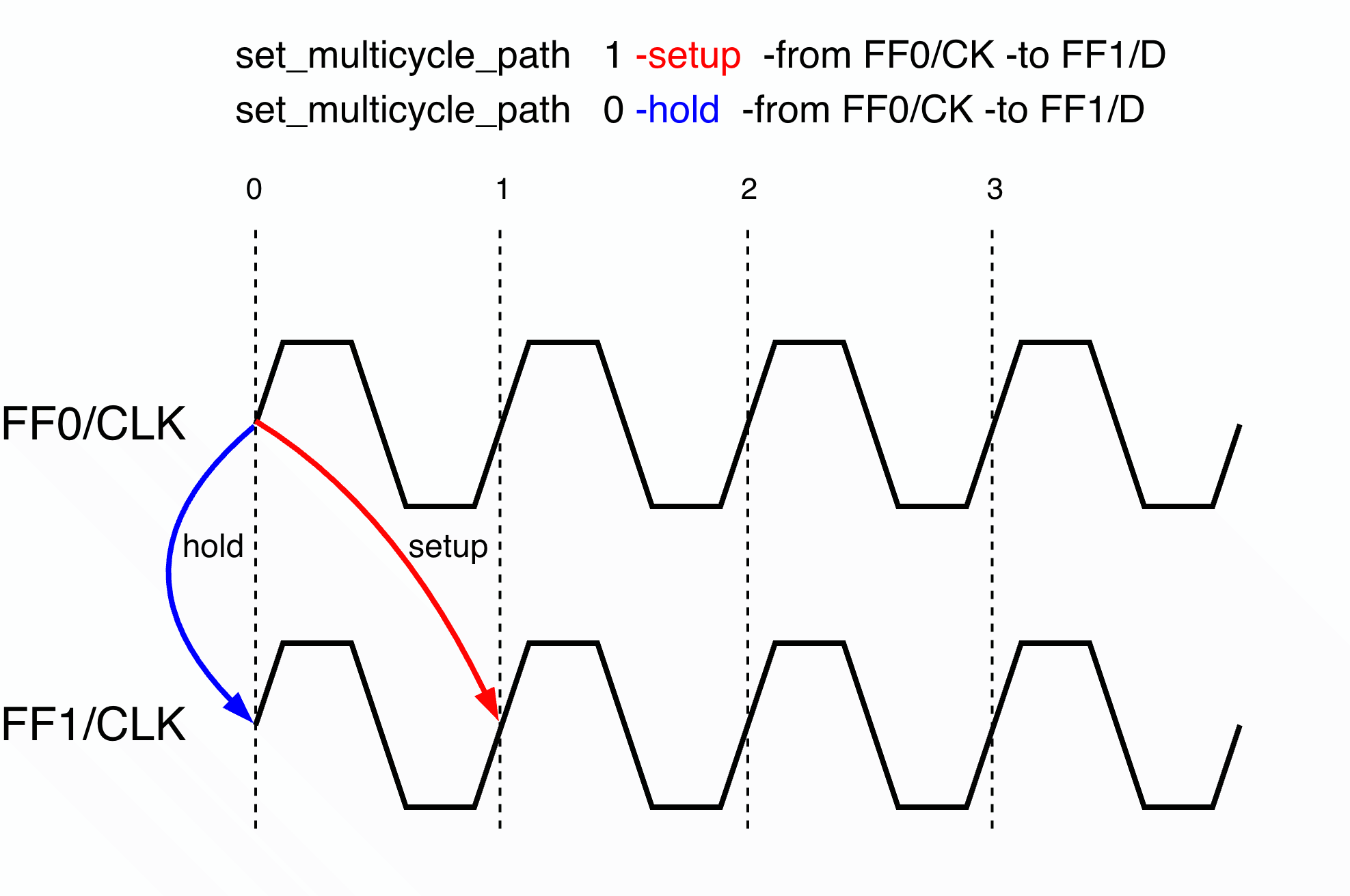 Default single-cycle timing: setup checks at T+1, hold checks at T
B. Multi-cycle Path
When data takes N (N > 1) cycles to propagate, set_multicycle_path should be used to relax the timing requirement.
1
2
# Setup: data must arrive by the 2nd cycle
set_multicycle_path 2 -setup -from [get_pins FF0/CK] -to [get_pins FF1/D]
However, if you specify only the setup multicycle, the tool automatically adjusts the hold-check relationship relative to setup, as shown in (a) in the figure below:
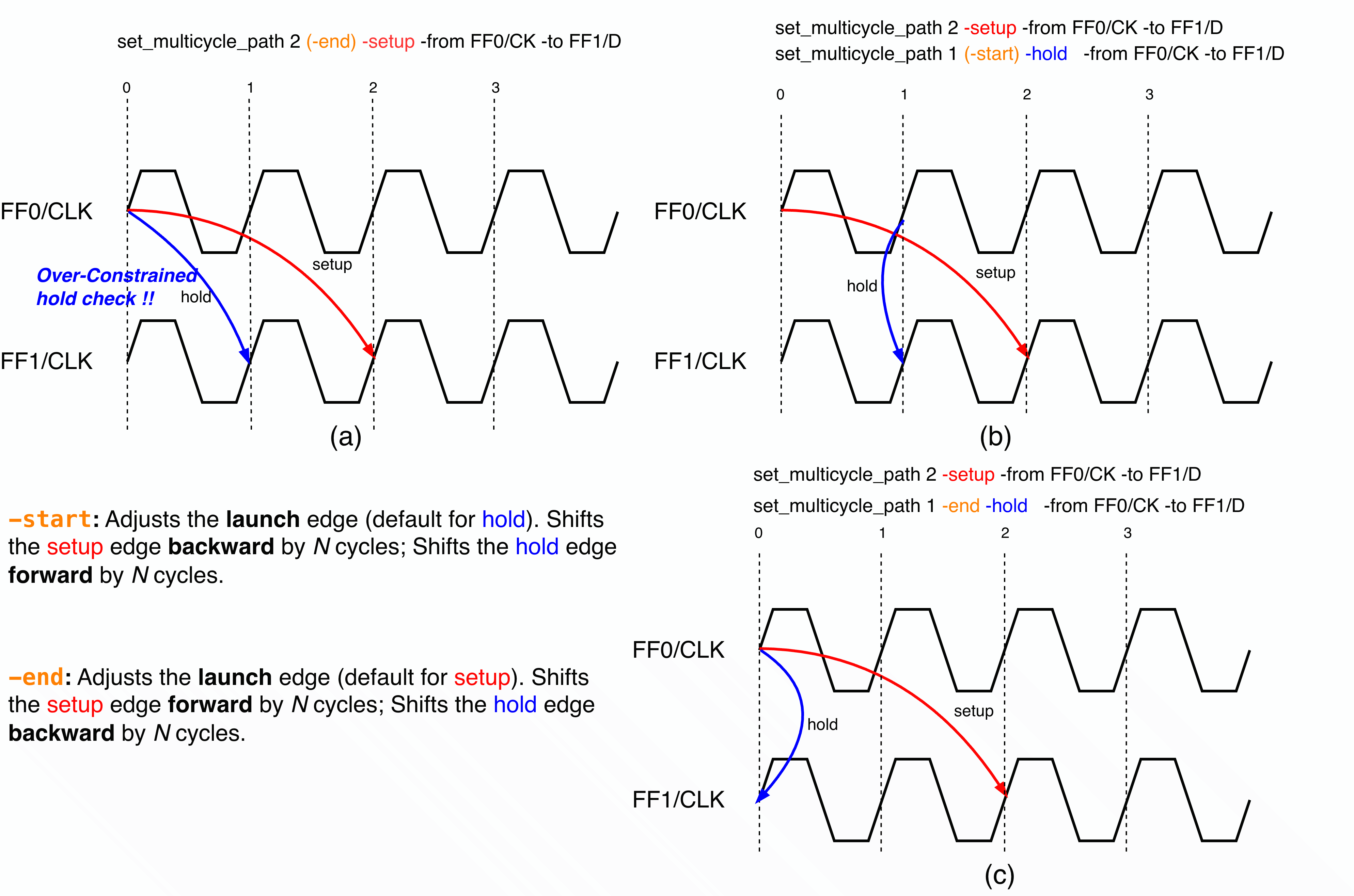
To correct this, either move the launch edge of the hold check forward by one cycle or move the capture edge of the hold check backward by one cycle. Cases (b) and (c) show the two correct approaches.
Since the default reference for -hold is -start, we can omit -start when moving the launch edge. However, -end should be explicitly specified when moving the capture edge.
1
2
3
4
5
# (b) Move the launch edge of the hold check forward by 1 cycle
set_multicycle_path 1 (-start) -hold -from [get_pins FF0/CK] -to [get_pins FF1/D]

# (c) Move the capture edge of the hold check backward by 1 cycle
set_multicycle_path 1 -end -hold -from [get_pins FF0/CK] -to [get_pins FF1/D]
4. Cross-Frequency Clock Examples
Use multicycle constraints between different clocks only when those clocks are timing-related (synchronous/derived and intentionally timed together).
Do not use multicycle to constrain asynchronous CDC paths.
CDC boundary: If two clocks are asynchronous, constrain them with CDC/clock-group intent (for example, asynchronous clock grouping or false-path strategy), not multicycle.
Slow-to-Fast Clock Transfer
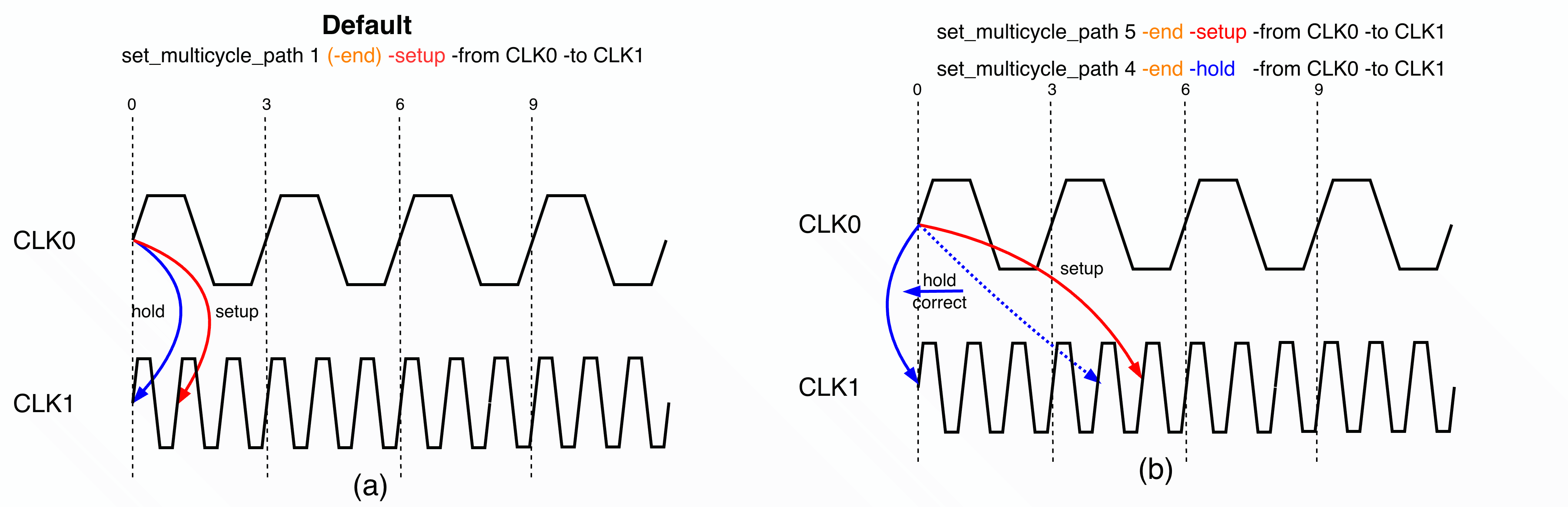
When launching from a slow related clock domain (CLK0) to a fast related clock domain (CLK1), the default scenario without multicycle is shown in (a). If five cycles are allowed for data to propagate from CLK0 to CLK1, the commands should be:
1
2
3
4
# 5-cycle multicycle: CLK1 takes 5 cycles to capture the data from CLK0
set_multicycle_path 5 -end -setup -from CLK0 -to CLK1
# Correct hold checking with 4 cycles using -end
set_multicycle_path 4 -end -hold -from CLK0 -to CLK1
After the setup multicycle command is applied, hold checking is also automatically adjusted (dashed blue line in the figure). To correct hold checking, set the hold multicycle to 4 cycles on the capture edge by adding -end to the command.
Fast-to-Slow Clock Transfer
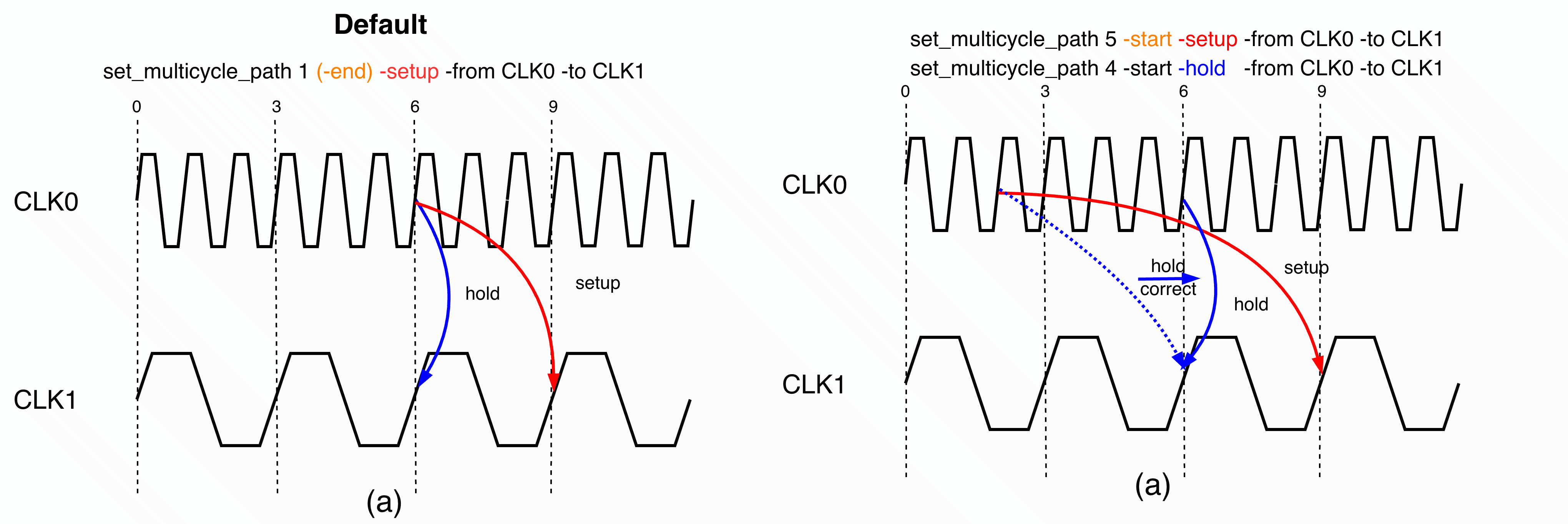
When launching from a fast related clock domain (CLK0) to a slow related clock domain (CLK1), the default scenario without multicycle is shown in (a). If five cycles are allowed for data to propagate from CLK0 to CLK1, the commands should be:
1
2
3
4
# 5-cycle multicycle: CLK0 takes 5 cycles to launch the data to CLK1
set_multicycle_path 5 -start -setup -from CLK0 -to CLK1
# Correct hold checking with 4 cycles using -start
set_multicycle_path 4 -start -hold -from CLK0 -to CLK1
After the setup multicycle command is applied, hold checking is also automatically adjusted (dashed blue line in the figure). To correct hold checking, set the hold multicycle to 4 cycles on the launch edge by adding -start to the command.
5. Multicycle Pattern Summary
The table below summarizes common multicycle patterns:
| Scenario | Setup Command | Hold Command | Notes |
|---|---|---|---|
| Same-frequency | set_multicycle_path N -setup | set_multicycle_path (N-1) -hold | -start or -end has the same effect |
| Slow-to-fast (related clocks) | set_multicycle_path N -end -setup | set_multicycle_path (N-1) -end -hold | Capture edge reference: -end |
| Fast-to-slow (related clocks) | set_multicycle_path N -start -setup | set_multicycle_path (N-1) -start -hold | Launch edge reference: -start |
6. Verification Checklist
After defining multicycle constraints, always verify with these commands:
1
2
3
4
5
6
7
8
9
10
11
12
13
14
15
# Check for missing or incomplete constraints
check_timing

# Review all timing exceptions
report_exceptions

# Verify setup timing on representative paths
report_timing [-check_type|-delay_type] max \
  -from [get_cells u_pipe/stage0_reg0] \
  -to [get_cells u_pipe/stage1_reg0]

# Verify hold timing on the same paths
report_timing [-check_type|-delay_type] min \
  -from [get_cells u_pipe/stage0_reg0] \
  -to [get_cells u_pipe/stage1_reg0]
Is this blog helpful? Help fuel more in-depth technical content by treating me to a coffee! Your support keeps the knowledge flowing ☕✨
